hyprmoncfg
Share on:
Enter Your Mastodon Instance
Copy the link below to share to Mastodon
https://terminaltrove.com/hyprmoncfg/
A terminal first monitor configurator and daemon for Hyprland.
Script Preview
Review this script before executing in your terminal.
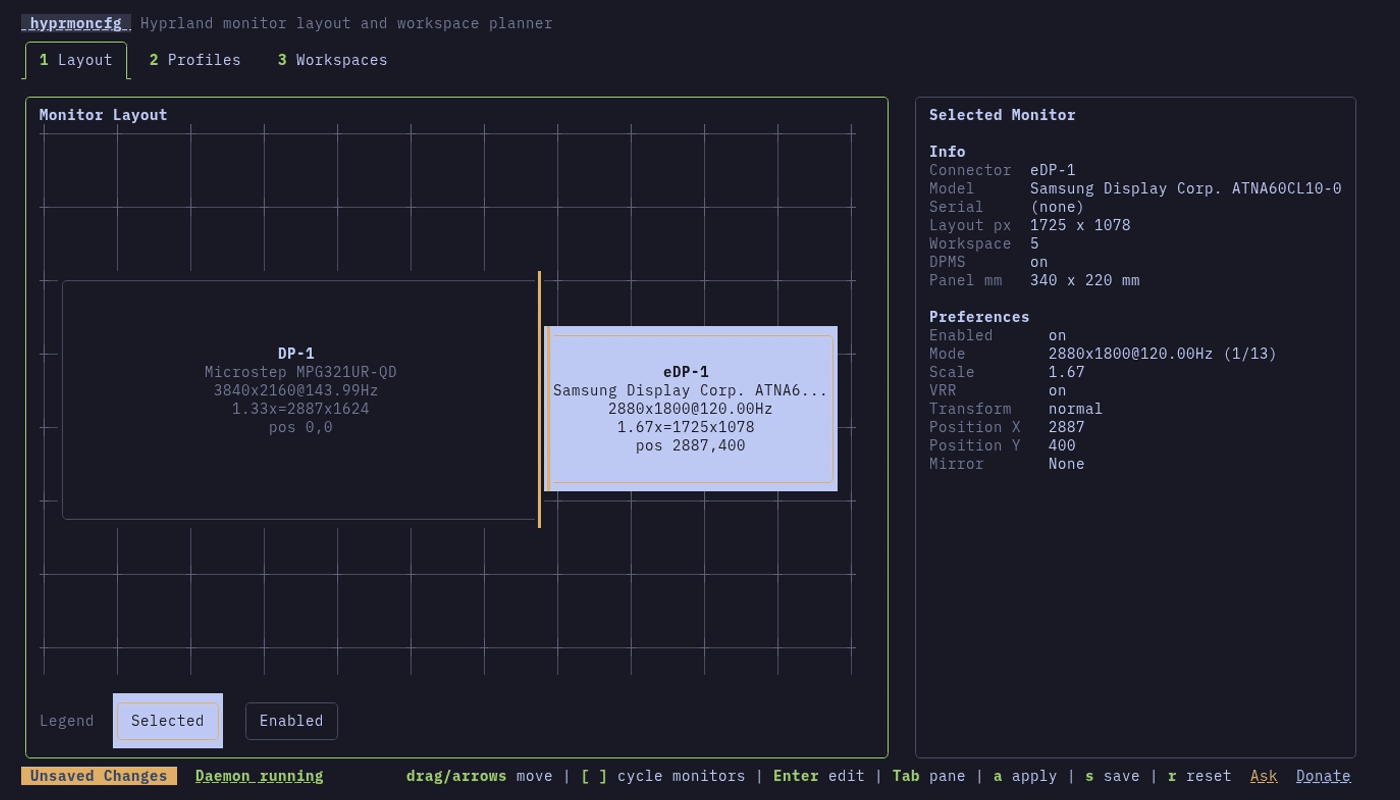

hyprmoncfg is a TUI and CLI tool for configuring Hyprland monitors, saving named display profiles, and fixing broken layouts in the terminal.
Instead of hand editing monitor configs and lining screens manually, this tool handles monitor placement, workspace planning, mirroring, scaling, transforms and also hardware based monitor matching.
Compared with heavier GUI tools, it keeps profile editing and auto-switching without extra runtime dependencies beyond Hyprland, while the background daemon automatically applies the best matching profile on hotplug. After changing a profile, you can automatically revert it if there is an issue.
Useful for Hyprland users with multiple monitor setups, hyprmoncfg can be used when you need to move between a desk, dock, external screen, or projector and want saved profiles, auto-switching, and monitor layout control in a TUI without hand-editing config files.