bullmq-dash
Share on:
Enter Your Mastodon Instance
Copy the link below to share to Mastodon
https://terminaltrove.com/bullmq-dash/
A TUI dashboard for BullMQ.
Script Preview
Review this script before executing in your terminal.
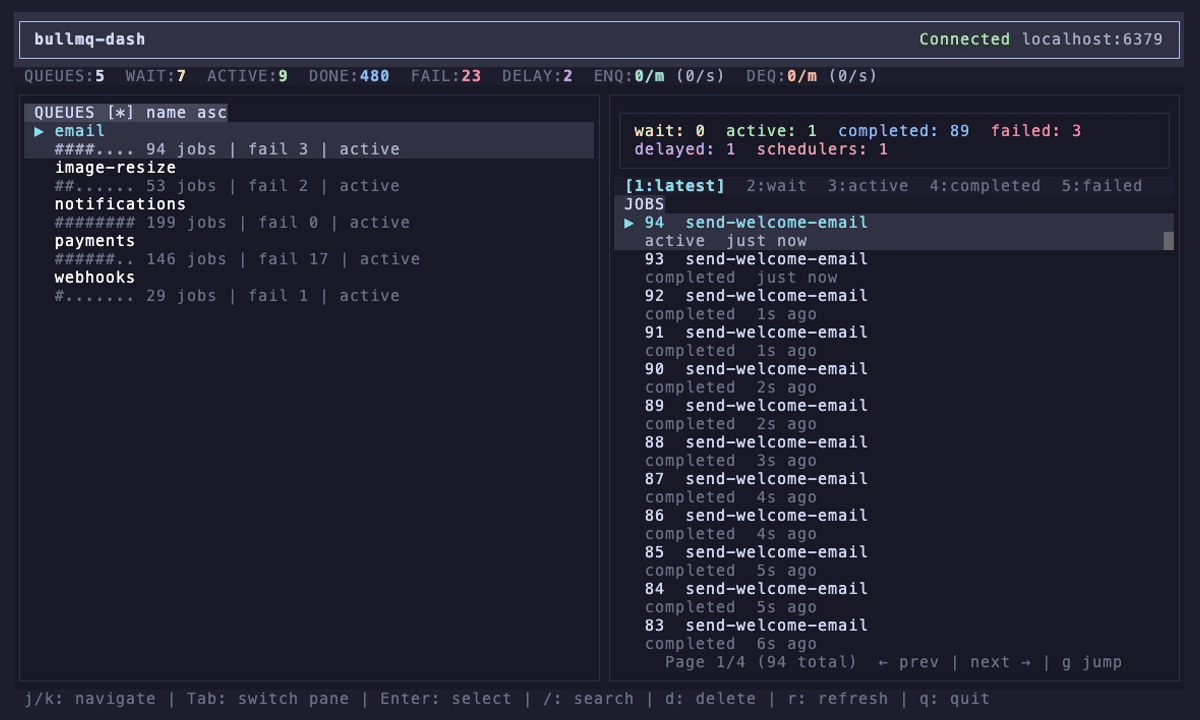


bullmq-dash is a terminal dashboard for monitoring BullMQ queues and jobs through Redis.
It can queue jobs in the terminal and display their job statuses, can track job failures, and comes with the scheduler history for viewing previous jobs. This tool can enqueue or dequeue jobs with configurable polling intervals, and also for job controls, you can inspect data and stack traces, delete jobs and retry failures individually or in batches.
On any failed job, bullmq-dash can show the details of the job that failed, and it supports filtering and search with statuses. It also supports vim-keybindings, named Redis profiles and has a troubleshooting 'doctor' subcommand used for diagnosing connection issues and errors.
Backend developers, operators and those familiar with Redis may find bullmq-dash useful for debugging BullMQ background jobs and interacting with them across development and production services.