diskbloom
Share on:
Enter Your Mastodon Instance
Copy the link below to share to Mastodon
https://terminaltrove.com/diskbloom/
A pastel, WizTree-style treemap disk visualizer that lives in your terminal.
Script Preview
Review this script before executing in your terminal.
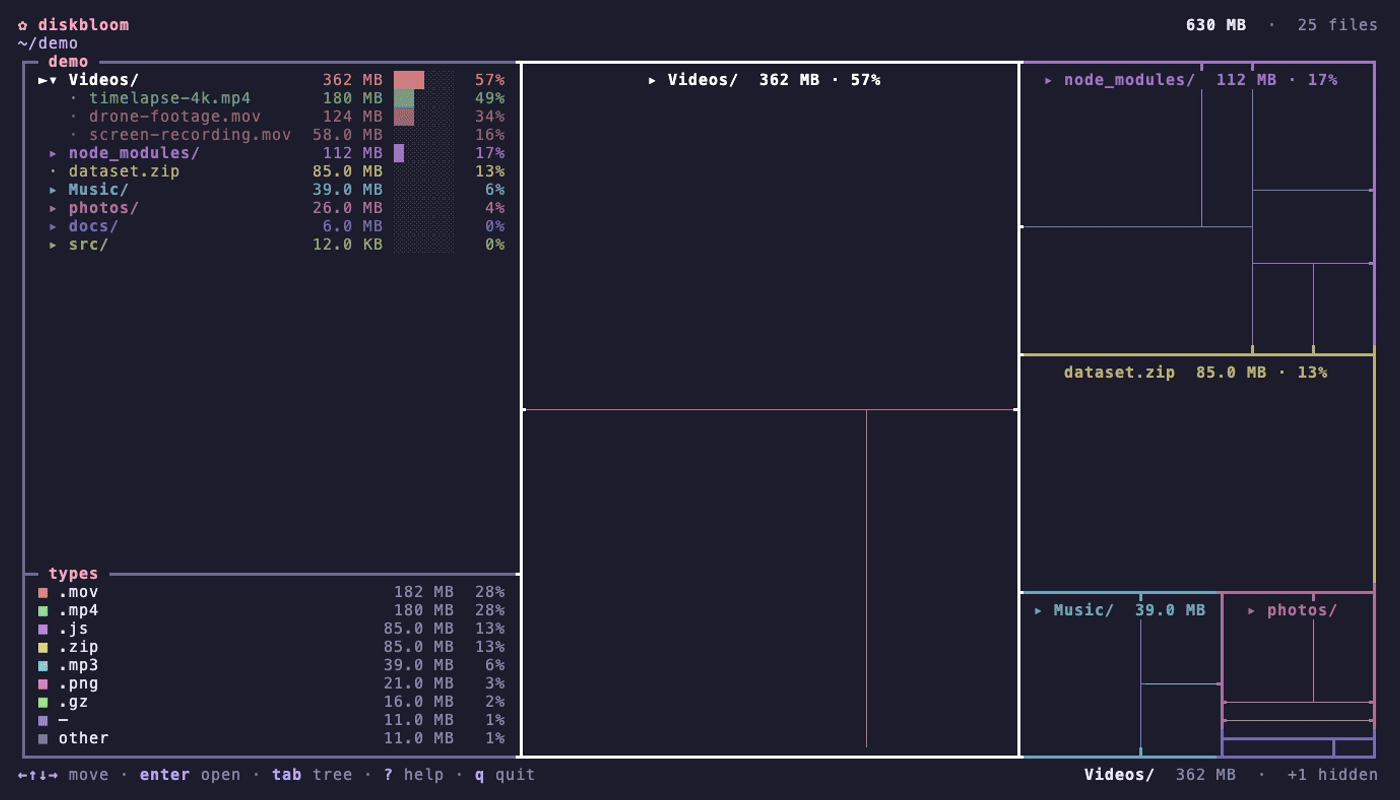


diskbloom is a disk usage TUI that maps files and folders as a size-weighted terminal tree-map.
It scans allocated disk space concurrently, de-duplicates hard-links and ranks file types by color. It also supports navigating into folders, re-scanning paths, soft-deleting data and has a permanent delete option to hard delete any file in the filesystem.
The file-type distribution can be found at the bottom left of the interface, and it shows which files have the largest percentage in a given folder. This tool can indicate the sizes of hidden files, and can show them in the dual-pane tree by default via pressing the tab key.
diskbloom works well for users who are developers, digital archivers, disk management specialists, system administrators and DevOps users who need to visually manage large files on their machine. It can be used to identify hidden files that take up disk space, especially if it is a remote machine via SSH.